<?xml version="1.0" encoding="utf-8"?><feed xmlns="http://www.w3.org/2005/Atom" ><generator uri="https://jekyllrb.com/" version="3.10.0">Jekyll</generator><link href="https://orsdanilo.github.io/feed.xml" rel="self" type="application/atom+xml" /><link href="https://orsdanilo.github.io/" rel="alternate" type="text/html" /><updated>2026-06-20T19:42:35+00:00</updated><id>https://orsdanilo.github.io/feed.xml</id><title type="html">orsdanilo</title><subtitle>Data and art stuff</subtitle><author><name>Danilo de Oliveira</name></author><entry><title type="html">Python Packages and Virtual Environments</title><link href="https://orsdanilo.github.io/blog/python-packages-venvs/" rel="alternate" type="text/html" title="Python Packages and Virtual Environments" /><published>2020-08-03T00:00:00+00:00</published><updated>2020-08-03T00:00:00+00:00</updated><id>https://orsdanilo.github.io/blog/python-packages-venvs</id><content type="html" xml:base="https://orsdanilo.github.io/blog/python-packages-venvs/"><![CDATA[<style>
table:nth-of-type(1) {
    display:table;
    width:100%;
}
</style>

<p>There are several tools to keep Python projects organized and running without compatibility issues. In fact, it can get confusing, as some are similar and seem to do the same thing. This article highlights the main ones, hopefully giving good directions for Python newcomers and eventually clearing some points Python developers may have overlooked. We start with brief clarifications on the concepts of packages and virtual environments and the default tools for Python, then present the <code class="language-plaintext highlighter-rouge">conda</code> distribution, and conclude with the similarities and differences between <code class="language-plaintext highlighter-rouge">conda</code> and <code class="language-plaintext highlighter-rouge">pip</code>/<code class="language-plaintext highlighter-rouge">venv</code>.</p>

<h2 id="python-packages">Python Packages</h2>

<p>It is a good practice to refactor code so as to make it more reusable. A Python file containing variables, classes and/or functions can be distributed and reused as a module. Suppose we write the file <code class="language-plaintext highlighter-rouge">foo.py</code>:</p>
<div class="language-python highlighter-rouge"><div class="highlight"><pre class="highlight"><code><span class="k">def</span> <span class="nf">bar</span><span class="p">(</span><span class="n">x</span><span class="p">,</span> <span class="n">y</span><span class="p">):</span>
  <span class="k">return</span> <span class="n">x</span> <span class="o">+</span> <span class="n">y</span>
</code></pre></div></div>
<p>This file is a module. The <a href="https://docs.python.org/3/tutorial/modules.html">Python doc on modules</a> says:</p>
<blockquote>
  <p>A module is a file containing Python definitions and statements. The file name is the module name with the suffix .py appended.</p>
</blockquote>

<p>Running Python or a Python file from the same folder, the module can be imported in the following manner:</p>
<div class="language-python highlighter-rouge"><div class="highlight"><pre class="highlight"><code><span class="o">&gt;&gt;&gt;</span> <span class="kn">import</span> <span class="nn">foo</span>
<span class="o">&gt;&gt;&gt;</span> <span class="n">foo</span><span class="p">.</span><span class="n">bar</span><span class="p">(</span><span class="mi">1</span><span class="p">,</span><span class="mi">2</span><span class="p">)</span>
<span class="mi">3</span>
</code></pre></div></div>

<p>Or alternatively:</p>
<div class="language-python highlighter-rouge"><div class="highlight"><pre class="highlight"><code><span class="o">&gt;&gt;&gt;</span> <span class="kn">from</span> <span class="nn">foo</span> <span class="kn">import</span> <span class="n">bar</span>
<span class="o">&gt;&gt;&gt;</span> <span class="n">bar</span><span class="p">(</span><span class="mi">1</span><span class="p">,</span><span class="mi">2</span><span class="p">)</span>
<span class="mi">3</span>
</code></pre></div></div>

<p>It is also possible to create shorter aliases for the imports, binding the alias to the module contents. Some famous ones are:</p>
<div class="language-python highlighter-rouge"><div class="highlight"><pre class="highlight"><code><span class="o">&gt;&gt;&gt;</span> <span class="kn">import</span> <span class="nn">numpy</span> <span class="k">as</span> <span class="n">np</span>
<span class="o">&gt;&gt;&gt;</span> <span class="kn">import</span> <span class="nn">pandas</span> <span class="k">as</span> <span class="n">pd</span>
<span class="o">&gt;&gt;&gt;</span> <span class="kn">import</span> <span class="nn">matplotlib.pyplot</span> <span class="k">as</span> <span class="n">plt</span>
</code></pre></div></div>

<p>We can import all statements from a module using:</p>
<div class="language-python highlighter-rouge"><div class="highlight"><pre class="highlight"><code><span class="o">&gt;&gt;&gt;</span> <span class="k">from</span> <span class="o">&lt;</span><span class="n">module</span><span class="o">&gt;</span> <span class="k">import</span> <span class="o">*</span>
</code></pre></div></div>
<p>However, this is not recommended, as it can be inefficient and possibly hide some things that were already defined (namespace collision).</p>

<p>As the project grows and scales, these modules should be organized in a directory structure containing such types of files, which is then called an import package. We can use to a certain extent the analogy of packages as file system directories, and modules as files. More on packages and imports can be found on <a href="https://docs.python.org/3/reference/import.html">this page</a>.</p>

<p>As is presented on the docs, a regular package is typically implemented as a directory containing an <code class="language-plaintext highlighter-rouge">__init__.py</code> file. When it is imported, this <code class="language-plaintext highlighter-rouge">__init__.py</code> file is implicitly executed, and the objects it defines are bound to names in the package’s namespace. <code class="language-plaintext highlighter-rouge">__init__.py</code> can be an empty file in the simplest case, or contain initialization code for the package.</p>

<p>Import packages usually contain multiple files and are not so convenient for distribution. Enter source distribution packages, or <em>sdists</em>, which are compressed archives (<code class="language-plaintext highlighter-rouge">.tar.gz</code> files) containing one or more packages or modules, as is explained <a href="https://packaging.python.org/overview/">here</a>. Python also created the wheel package format (<code class="language-plaintext highlighter-rouge">.whl</code>), that allows shipping libraries with compiled artifacts, making installation faster.</p>

<p>Distributions can be found in repositories, called Package Indexes, which contain a web interface to automate package discovery and consumption. The default one for the Python community is the <a href="https://pypi.org">Python Package Index (PyPI)</a>. All Python developers can consume and distribute their distributions by making the <code class="language-plaintext highlighter-rouge">.tar.gz</code> and the <code class="language-plaintext highlighter-rouge">.whl</code> files available in this repository. Instructions on how to package and upload a distribution to PyPI can be found <a href="https://packaging.python.org/tutorials/packaging-projects/">here</a>.</p>

<h3 id="pip">pip</h3>

<p><a href="https://pip.pypa.io/en/stable/">Pip</a> is the recommended installer for Python packages. Packages can be easily installed from PyPI with this command:</p>
<div class="language-shell highlighter-rouge"><div class="highlight"><pre class="highlight"><code><span class="nv">$ </span>pip <span class="nb">install</span> &lt;packagename&gt;
</code></pre></div></div>

<p>Here are some other useful commands to upgrade, uninstall and list installed packages, respectively:</p>
<div class="language-shell highlighter-rouge"><div class="highlight"><pre class="highlight"><code><span class="nv">$ </span>pip <span class="nb">install</span> <span class="nt">--upgrade</span> &lt;packagename&gt;
<span class="nv">$ </span>pip uninstall &lt;packagename&gt;
<span class="nv">$ </span>pip list
</code></pre></div></div>

<h2 id="virtual-environments">Virtual Environments</h2>

<p>Sometimes different Python applications with different dependencies and specific package version requirements need to be executed on the same system. If they were all in the same Python installation, compatibility issues would arise. A solution for this kind of problem is the use of virtual environments.</p>

<p>Quoting the <a href="https://docs.python.org/3/tutorial/venv.html">Python documentation</a>, a virtual environment is:</p>
<blockquote>
  <p>A self-contained directory tree that contains a Python installation for a particular version of Python, plus a number of additional packages.</p>
</blockquote>

<p>With different virtual environments, the applications can run independently from one another, without conflicting requirements.</p>

<h3 id="venv">venv</h3>

<p>Since version 3.5 of Python, the recommended tool to create virtual environments is <a href="https://docs.python.org/3/library/venv.html#module-venv"><code class="language-plaintext highlighter-rouge">venv</code></a>, a built-in Python 3 module. The process is the following: navigate to the folder where the environment should be placed and enter the command:</p>
<div class="language-shell highlighter-rouge"><div class="highlight"><pre class="highlight"><code><span class="nv">$ </span>python3 <span class="nt">-m</span> venv &lt;envname&gt;
</code></pre></div></div>
<p>Where <code class="language-plaintext highlighter-rouge">&lt;envname&gt;</code> is the name of the new environment. It will by default use the newest Python 3 version installed on the computer as the version of the Python interpreter in the project.</p>

<p>To activate the virtual environment on Linux or MacOS, run:</p>
<div class="language-shell highlighter-rouge"><div class="highlight"><pre class="highlight"><code><span class="nv">$ </span><span class="nb">source</span> &lt;envname&gt;/bin/activate
</code></pre></div></div>

<p>Or on Windows:</p>
<div class="language-shell highlighter-rouge"><div class="highlight"><pre class="highlight"><code><span class="nv">$ </span>&lt;envname&gt;<span class="se">\S</span>cripts<span class="se">\a</span>ctivate.bat
</code></pre></div></div>

<p>After running this activation script, <code class="language-plaintext highlighter-rouge">(&lt;envname&gt;)</code> will be prefixed to the command prompt, showing what is the current environment, like so:</p>
<div class="language-shell highlighter-rouge"><div class="highlight"><pre class="highlight"><code><span class="o">(</span>&lt;envname&gt;<span class="o">)</span> <span class="err">$</span>
</code></pre></div></div>

<p>To exit the current env, type</p>
<div class="language-shell highlighter-rouge"><div class="highlight"><pre class="highlight"><code><span class="o">(</span>&lt;envname&gt;<span class="o">)</span> <span class="nv">$ </span>deactivate
</code></pre></div></div>

<p>Though it is common practice to create the virtual environment inside the project directory, it is not a good idea to keep it in the project repository, due to OS specifities and folder size. The best alternative is to persist the list of required packages and their versions to a file with the command below:</p>
<div class="language-shell highlighter-rouge"><div class="highlight"><pre class="highlight"><code><span class="o">(</span>&lt;envname&gt;<span class="o">)</span> <span class="nv">$ </span>pip freeze <span class="o">&gt;</span> requirements.txt
</code></pre></div></div>

<p>And then anyone who needs to run the project can obtain the packages in the following manner:</p>
<div class="language-shell highlighter-rouge"><div class="highlight"><pre class="highlight"><code><span class="o">(</span>&lt;envname&gt;<span class="o">)</span> <span class="nv">$ </span>pip <span class="nb">install</span> <span class="nt">-r</span> requirements.txt
</code></pre></div></div>

<h2 id="anaconda">Anaconda</h2>

<p><a href="https://www.anaconda.com">Anaconda</a> is a free and open-source distribution of the Python and R programming languages for scientific computing and data science. It comes with Python, approximately 250 scientific packages installed out-of-the-box and Anaconda Navigator, a Graphical User Interface (GUI).</p>

<p>If you’re not new to Python or programming in general and somewhat confortable with the idea of using the Command Line Interface (CLI), it is preferred to use <a href="https://docs.conda.io/en/latest/miniconda.html">Miniconda</a> instead, which installs only Python, <code class="language-plaintext highlighter-rouge">conda</code> (more on that below) and, on Windows, Anaconda Prompt.</p>

<h3 id="conda">conda</h3>

<p><a href="https://conda.io/en/latest/">Conda</a> is an open source package management system and environment management system. Like <code class="language-plaintext highlighter-rouge">pip</code>, it can install Python packages, though it is language agnostic, and can deal with other programming languages and their dependencies as well. Like <code class="language-plaintext highlighter-rouge">venv</code>, it can create and manage virtual environments, and it can also manage different Python versions, which would require another tool otherwise, such as <code class="language-plaintext highlighter-rouge">pyenv</code> or <code class="language-plaintext highlighter-rouge">virtualenv</code>.</p>

<p>Similar to <code class="language-plaintext highlighter-rouge">venv</code>, a virtual environment can be created with a simple command. Here the environment folder will be created in Anaconda’s default folder.</p>
<div class="language-shell highlighter-rouge"><div class="highlight"><pre class="highlight"><code><span class="nv">$ </span>conda create <span class="nt">--name</span> &lt;envname&gt;
</code></pre></div></div>

<p>Alternatively, the environment can be created in another directory, e.g. the project folder. We only need to provide the flag <code class="language-plaintext highlighter-rouge">--prefix</code> alongside the path for the new environment folder:</p>
<div class="language-shell highlighter-rouge"><div class="highlight"><pre class="highlight"><code><span class="nv">$ </span>conda create <span class="nt">--prefix</span> &lt;envpath&gt;
</code></pre></div></div>

<p><code class="language-plaintext highlighter-rouge">python=&lt;pythonversion&gt;</code> or <code class="language-plaintext highlighter-rouge">&lt;packagename&gt;</code> can be appended to the <code class="language-plaintext highlighter-rouge">conda create</code> command, creating an environment with such Python version, and with such package and its dependencies, respectively.</p>

<p>A list of the existing environments can be obtained by typing either one of these:</p>
<div class="language-shell highlighter-rouge"><div class="highlight"><pre class="highlight"><code><span class="nv">$ </span>conda info <span class="nt">--envs</span>
<span class="nv">$ </span>conda <span class="nb">env </span>list
</code></pre></div></div>

<p>Packages can be installed from the conda repository by executing the following:</p>
<div class="language-shell highlighter-rouge"><div class="highlight"><pre class="highlight"><code><span class="o">(</span>&lt;envname&gt;<span class="o">)</span> <span class="nv">$ </span>conda <span class="nb">install</span> &lt;packagename&gt;
</code></pre></div></div>

<p>As with <code class="language-plaintext highlighter-rouge">pip</code>, packages and their dependencies can be exported to a file, only here it is a YAML file:</p>
<div class="language-shell highlighter-rouge"><div class="highlight"><pre class="highlight"><code><span class="o">(</span>&lt;envname&gt;<span class="o">)</span> <span class="nv">$ </span>conda <span class="nb">env export</span> <span class="o">&gt;</span> environment.yml
</code></pre></div></div>

<p>And then the file can be used to recreate the environment:</p>
<div class="language-shell highlighter-rouge"><div class="highlight"><pre class="highlight"><code><span class="nv">$ </span>conda <span class="nb">env </span>create <span class="nt">-f</span> environment.yml
</code></pre></div></div>

<p>You can find more commands for <code class="language-plaintext highlighter-rouge">conda</code> in this <a href="https://docs.conda.io/projects/conda/en/4.6.0/_downloads/52a95608c49671267e40c689e0bc00ca/conda-cheatsheet.pdf">cheat sheet</a>.</p>

<p>Here is a comparison table between <code class="language-plaintext highlighter-rouge">conda</code> and <code class="language-plaintext highlighter-rouge">pip</code> taken from the <a href="https://www.anaconda.com/blog/understanding-conda-and-pip">Anaconda Blog</a>:</p>

<table>
  <thead>
    <tr>
      <th style="text-align: center"> </th>
      <th style="text-align: center">conda</th>
      <th style="text-align: center">pip</th>
    </tr>
  </thead>
  <tbody>
    <tr>
      <td style="text-align: center">Manages</td>
      <td style="text-align: center">Binaries</td>
      <td style="text-align: center">Wheel or source</td>
    </tr>
    <tr>
      <td style="text-align: center">Can require compilers</td>
      <td style="text-align: center">No</td>
      <td style="text-align: center">Yes</td>
    </tr>
    <tr>
      <td style="text-align: center">Package types</td>
      <td style="text-align: center">Any</td>
      <td style="text-align: center">Python-only</td>
    </tr>
    <tr>
      <td style="text-align: center">Creates environment</td>
      <td style="text-align: center">Yes, built-in</td>
      <td style="text-align: center">No, requires virtualenv or venv</td>
    </tr>
    <tr>
      <td style="text-align: center">Dependency checks</td>
      <td style="text-align: center">Yes</td>
      <td style="text-align: center">No</td>
    </tr>
    <tr>
      <td style="text-align: center">Package sources</td>
      <td style="text-align: center">Anaconda repo and cloud</td>
      <td style="text-align: center">PyPI</td>
    </tr>
  </tbody>
</table>

<p>It should be noted that it is not such a fair comparison, as <code class="language-plaintext highlighter-rouge">conda</code> aims to do more than <code class="language-plaintext highlighter-rouge">pip</code>, containing more features and not being restricted to Python.</p>

<p>An important additional piece of information is the number of packages available in each tool: while the Anaconda Repository features around two thousand packages, PyPI boasts more than 250 thousand projects from the Python community. Therefore, it is not uncommon to find with <code class="language-plaintext highlighter-rouge">pip</code> a library that’s not available with <code class="language-plaintext highlighter-rouge">conda</code>.</p>

<h2 id="conclusion">Conclusion</h2>

<p>All in all, <code class="language-plaintext highlighter-rouge">conda</code> is a great tool for doing data science work. Gathering different functionalities all in on tool certainly makes things a bit more fluid. If you’re doing pure Python work, <code class="language-plaintext highlighter-rouge">pip</code>+<code class="language-plaintext highlighter-rouge">venv</code> will probably do the job just fine. For general data science projects with varied scientific libraries and dependencies, it may be a good idea to use <code class="language-plaintext highlighter-rouge">conda</code>. Since the two package managers aren’t exactly interchangeable, the recommended approach is to use an isolated <code class="language-plaintext highlighter-rouge">conda</code> environment, trying to install everything with <code class="language-plaintext highlighter-rouge">conda</code> and backing off to <code class="language-plaintext highlighter-rouge">pip</code> when needed.</p>

<p>In this article I tried to gather some information on the available tools for Python development. I recommend that you check the numerous references along this page, do your research and experiments, and then decide what works best for you. I hope it was helpful!</p>]]></content><author><name>Danilo de Oliveira</name></author><category term="Blog" /><category term="Python" /><category term="Virtual Environment" /><summary type="html"><![CDATA[]]></summary></entry><entry><title type="html">Decoders for Automatic Speech Recognition</title><link href="https://orsdanilo.github.io/blog/asr-decoding/" rel="alternate" type="text/html" title="Decoders for Automatic Speech Recognition" /><published>2020-07-21T00:00:00+00:00</published><updated>2020-07-03T02:45:00+00:00</updated><id>https://orsdanilo.github.io/blog/asr-decoding</id><content type="html" xml:base="https://orsdanilo.github.io/blog/asr-decoding/"><![CDATA[<script type="text/x-mathjax-config">
    MathJax.Hub.Config({
      tex2jax: {
        skipTags: ['script', 'noscript', 'style', 'textarea', 'pre'],
        inlineMath: [['$','$']]
      }
    });
  </script>

<script src="https://cdn.mathjax.org/mathjax/latest/MathJax.js?config=TeX-AMS-MML_HTMLorMML" type="text/javascript"></script>

<style>
table:nth-of-type(1) {
    display:table;
    width:100%;
}
</style>

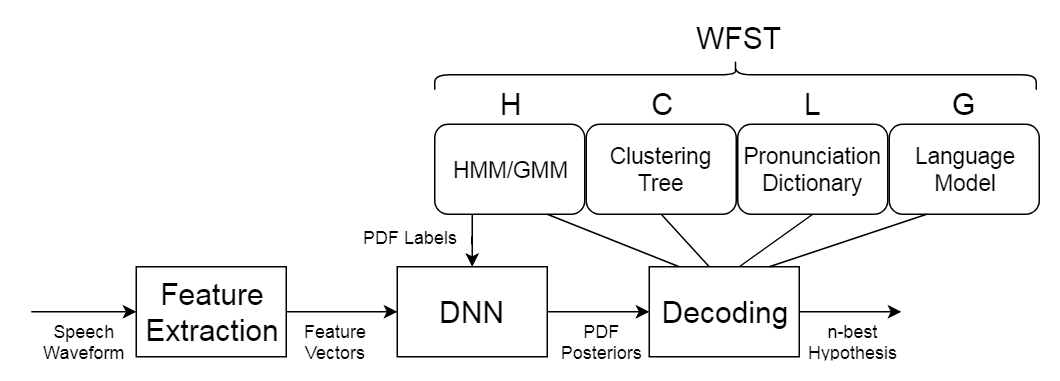
<p>Automatic Speech Recognition (ASR) systems convert speech from a recorded audio signal to text. An ASR system aims to infer the original words given an observable signal, most commonly following a probabilistic approach <a href="#references">[1]</a>.</p>

<p style="font-size: 80%; text-align: center;" id="fig1"><img src="/assets/images/ASRtest.png" alt="ASRtest" /><br />
<strong>Figure 1:</strong> Diagram of an ASR system.</p>

<p>The input audio is split into overlapping frames of 25ms shifted by 10ms, so that within this tiny time window, the speech signal is considered to be stationary, allowing for the analysis featured here. Before decoding, these are fed to a feature extractor, which reduces signal dimensionality and extracts the most relevant information, that is, the linguistic message.</p>

<p>Decoding is the process of calculating which sequence of words is most likely to match the acoustic signal represented by the feature vectors <a href="#references">[1]</a> of a given utterance (a continuous piece of speech beginning and ending with a clear pause). Decoding is executed based on three sources of information:</p>

<ul>
  <li><strong>Acoustic model:</strong> An ensemble of <a href="https://en.wikipedia.org/wiki/Hidden_Markov_model">Hidden Markov Models</a> representing words or phonemes;</li>
  <li><strong>Language model:</strong> A list of word sequence probabilities;</li>
  <li><strong>Lexicon:</strong> A dictionary of words and their respective phonemes.</li>
</ul>

<p>During decoding, we essentially use these to try to predict the word sequence $\hat{W}$ that best matches the acoustic observation $\boldsymbol{X}=X_1 X_2\ldots X_n$, obtained using Bayes rule:</p>

\[\begin{equation*}
\begin{split}
\boldsymbol{\hat{W}} &amp;= arg\max_{\boldsymbol{W}}P(\boldsymbol{W}\mid \boldsymbol{X})\\
    &amp;= arg\max_{\boldsymbol{W}}\frac{P(\boldsymbol{X}\mid \boldsymbol{W})P(\boldsymbol{W})}{P(\boldsymbol{X})}\\
    &amp;\propto arg\max_{\boldsymbol{W}} (\underbrace{P(\boldsymbol{X} \mid \boldsymbol{W})}_{\substack{\text{Acoustic} \\ \text{model}}} \underbrace{P(\boldsymbol{W})}_{\substack{\text{Language} \\ \text{model}}})
\end{split}
\end{equation*}\]

<p>The acoustic analysis is performed by a Deep Neural Network, which is trained to output the posterior probability $P(\boldsymbol{X} \mid \boldsymbol{W})$ of obtaining this observation given a candidate word sequence. The prior probability $P(\boldsymbol{W})$ of a word sequence is obtained from a language model, containing the allowed and most frequent occurrences for a given language. Therefore, prior probability and posterior likelihood are combined in order to output the best prediction with the available information.</p>

<p>One solution for the search of the best word sequence involves the use of Weighted Finite State Transducers (WFSTs). I wrote about it in <a href="/blog/asr-wfst/">this post</a>, if you feel up for the challenge.</p>

<h2 id="references">References</h2>

<p>[1] <a href="https://books.google.com.br/books?hl=pt-BR&amp;lr=&amp;id=H_rGeqqaulYC&amp;oi=fnd&amp;pg=PR3&amp;dq=Gruhn,+R.+E.,+Minker,+W.,+%26+Nakamura,+S.+(2011).+Statistical+Pronunciation+Modeling+for+Non-Native+Speech+Processing.+Springer+Berlin+Heidelberg.&amp;ots=fvEiLQNOnn&amp;sig=xEkxaP7JGRYzddwxUg-6GQMEHN8#v=onepage&amp;q=Gruhn%2C%20R.%20E.%2C%20Minker%2C%20W.%2C%20%26%20Nakamura%2C%20S.%20(2011).%20Statistical%20Pronunciation%20Modeling%20for%20Non-Native%20Speech%20Processing.%20Springer%20Berlin%20Heidelberg.&amp;f=false">Gruhn, R. E., Minker, W., &amp; Nakamura, S. (2011). Statistical Pronunciation Modeling for Non-Native Speech Processing. Springer Berlin Heidelberg.</a></p>]]></content><author><name>Danilo de Oliveira</name></author><category term="Blog" /><category term="ASR" /><category term="Decoder" /><summary type="html"><![CDATA[]]></summary></entry><entry><title type="html">ASR with Weighted Finite State Transducers</title><link href="https://orsdanilo.github.io/blog/asr-wfst/" rel="alternate" type="text/html" title="ASR with Weighted Finite State Transducers" /><published>2020-07-21T00:00:00+00:00</published><updated>2020-07-03T02:45:00+00:00</updated><id>https://orsdanilo.github.io/blog/asr-wfst</id><content type="html" xml:base="https://orsdanilo.github.io/blog/asr-wfst/"><![CDATA[<script type="text/x-mathjax-config">
    MathJax.Hub.Config({
      tex2jax: {
        skipTags: ['script', 'noscript', 'style', 'textarea', 'pre'],
        inlineMath: [['$','$']]
      }
    });
  </script>

<script src="https://cdn.mathjax.org/mathjax/latest/MathJax.js?config=TeX-AMS-MML_HTMLorMML" type="text/javascript"></script>

<style>
table:nth-of-type(1) {
    display:table;
    width:100%;
}
</style>

<p>In <a href="/blog/asr-decoding/">this post</a>, the subject of decoders for Automatic Speech Recognition was introduced, presenting the task of searching for the best word sequence given an audio observation. One solution for that involves the use of Weighted Finite State Transducers (WFSTs). This post is theory heavy, so don’t worry if you don’t understand all of it on first try (I certainly didn’t).</p>

<p>WFSTs are static graphs encoding the whole word-sequence search space. They contain many levels of information, going from the acoustic model to phones in context, to single phonemes, to words, and finally, words in sequence.</p>

<p>A finite-state transducer is a <a href="https://en.wikipedia.org/wiki/Deterministic_finite_automaton">finite automaton</a> whose state transitions are labeled with both input and output symbols. Therefore, a path through the transducer encodes a mapping from an input to an output string. They provide a common and natural representation for major components of speech recognition systems, including <a href="https://en.wikipedia.org/wiki/Hidden_Markov_model">Hidden Markov Models (HMMs)</a>, context-dependency models, pronunciation dictionaries, statistical grammars and word or phone lattices <a href="#references">[1]</a>. The decoder goes through the WFST creating a lattice, a graph structure that contains the most probable - or less costly - paths for a given utterance (a continuous piece of speech beginning and ending with a clear pause), taking into account both acoustic and language costs.</p>

<p>A transducer $T=(\mathcal{A}, \mathcal{B}, \mathcal{Q}, I, F, E, \lambda, \rho)$ over a semiring $\mathbb{K}$ is characterized by:</p>

<ul>
  <li>$\mathcal{A}$: finite input alphabet;</li>
  <li>$\mathcal{B}$: finite output alphabet;</li>
  <li>$\mathcal{Q}$: finite set of states;</li>
  <li>$I$: set of initial states;</li>
  <li>$F$: set of final states;</li>
  <li>$E$: finite set of transitions;</li>
  <li>$\lambda$: initial state weight assignment;</li>
  <li>$\rho$: final state weight assignment.</li>
</ul>

<p>The set of transitions is $E\subseteq\bar{E}=\mathcal{Q}\times(\mathcal{A}\cup{\epsilon})\times(\mathcal{B}\cup{\epsilon})\times\mathbb{K}\times\mathcal{Q}$. This means it is a subset of all possibilities of transition from one state to another (or to itself) with an input label, an output label and a weight. $\epsilon$ means an empty label, no input or no output.</p>

<p>The operations are executed on specific <a href="https://en.wikipedia.org/wiki/Semiring"><em>semirings</em></a>. A semiring is a set $\mathbb{R}$ equipped with two binary operators addition ($\oplus$) and multiplication ($\otimes$), with identity elements $\bar{0}$ and $\bar{1}$, respectively. One simple example of a semiring is the set of natural numbers (including zero) under ordinary addition and multiplication <a href="#references">[2]</a>. Two commonly used semirings in ASR are the <em>probability semiring</em> and the <em>log semiring</em>, shown in <a href="#tab1">Table 1</a>.</p>

<table id="tab1">
  <thead>
    <tr>
      <th style="text-align: center">SEMIRING</th>
      <th style="text-align: center">SET</th>
      <th style="text-align: center">$\oplus$</th>
      <th style="text-align: center">$\otimes$</th>
      <th style="text-align: center">$\bar{0}$</th>
      <th style="text-align: center">$\bar{1}$</th>
    </tr>
  </thead>
  <tbody>
    <tr>
      <td style="text-align: center">Probability</td>
      <td style="text-align: center">$\mathbb{R}_+$</td>
      <td style="text-align: center">$+$</td>
      <td style="text-align: center">$\times$</td>
      <td style="text-align: center">0</td>
      <td style="text-align: center">1</td>
    </tr>
    <tr>
      <td style="text-align: center">Log</td>
      <td style="text-align: center">$\mathbb{R} \cup {-\infty,+\infty}$</td>
      <td style="text-align: center">$\oplus_{log}$</td>
      <td style="text-align: center">+</td>
      <td style="text-align: center">$+\infty$</td>
      <td style="text-align: center">0</td>
    </tr>
  </tbody>
</table>
<p style="font-size: 80%; text-align: center;"><strong>Table 1:</strong> Probability and log semirings. $\oplus_{log}$ is defined by: $x \oplus y=-log(e^{-x}+e^{-y})$.}</p>

<p>There is a set of operations we can perform on transducers. The main ones are the following:</p>

<ul>
  <li><strong>Composition:</strong> Combining graphs, therefore different levels of representation;</li>
  <li><strong>Determinization:</strong> Making an automaton deterministic, that is, each state should have at most one transition with any given input label, which should not be the empty ($\epsilon$) symbols;</li>
  <li><strong>Minimization:</strong> Reducing the size of a deterministic automaton.</li>
</ul>

<p>A widely used toolkit for ASR is Kaldi <a href="#references">[3]</a>. A usual decoder in Kaldi contains a set of four WFSTs which are combined (or composed, as explained below): HMM-level, Context Dependency, Pronunciation Lexicon and Grammar. The mapping from input to output across transducers is shown in <a href="#fig1">Figure 1</a>.</p>

<p style="font-size: 80%; text-align: center;" id="fig1"><img src="/assets/images/hclg.png" alt="hclg" /><br />
<strong>Figure 1:</strong> Mapping of input and output across transducers.</p>

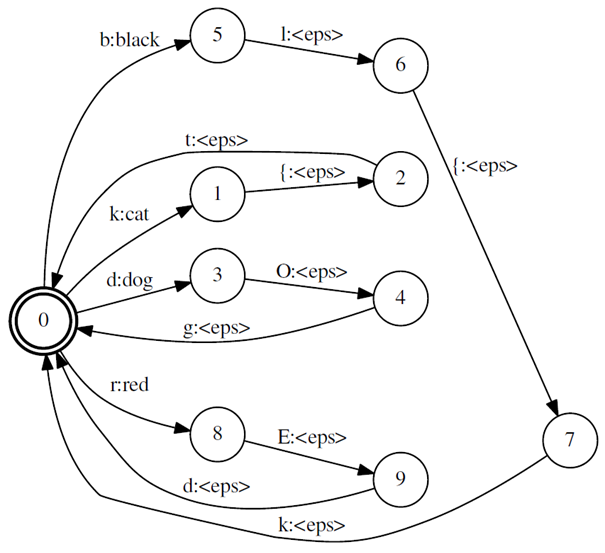
<p><a href="#fig2">Figure 2</a> is the representation of a grammar with full sentences. Arcs show legal word strings and their probabilities. As input and output labels are the same, we call this automaton an acceptor (it ends at a final state if the sequence is accepted by the WFST). The graph in <a href="#fig3">Figure 3</a> corresponds to a pronunciation lexicon, showing different possibilities of pronunciation and mapping a phone string to a word string in the lexicon. Since it <em>transduces</em> phones to words, it is called a transducer. Here are some Weighted finite-state transducer examples:</p>

<p style="font-size: 80%; text-align: center;" id="fig2"><img src="/assets/images/grammar_brcd.png" alt="grammar_brcd" /><br />
<strong>Figure 2:</strong> Example grammar FST.</p>

<p style="font-size: 80%; text-align: center;" id="fig3"><img src="/assets/images/lexicon_brcd.png" alt="lexicon_brcd" /><br />
<strong>Figure 3:</strong> Example pronunciation lexicon FST.</p>

<p>Essentially, the grammar graph shows us the allowed sequences of words along with the probability of their occurrence. It can be hand crafted through the use of regular expressions, rules or even direct build, but it can most notably be learned from data, creating stochastic $n$-gram models from text corpora.</p>

<p>The lexicon graph, on the other hand, presents the allowed pronunciations for the words. It is the <a href="https://en.wikipedia.org/wiki/Kleene_star">Kleene closure</a> of the union of individual word pronunciations, that is, the set of pronunciations for all word sequences. This means that there are loops in this automaton. For matters of efficiency, output word labels should be placed on the initial transition of words.</p>

<p>Below is a visual example of graph growth with composition of H, C, L and G transducers.</p>

<p style="font-size: 80%; text-align: center;" id="fig4"><img src="/assets/images/lg_brcd.png" alt="lg_brcd" /><br />
<strong>Figure 4:</strong> Example $L\circ G$.</p>

<p style="font-size: 80%; text-align: center;" id="fig5"><img src="/assets/images/clg_brcd.png" alt="clg_brcd" /><br />
<strong>Figure 5:</strong> Example $C\circ L\circ G$.</p>

<p style="font-size: 80%; text-align: center;" id="fig6"><img src="/assets/images/hclg_brcd.png" alt="hclg_brcd" /><br />
<strong>Figure 6:</strong> Example $C\circ L\circ G$.</p>

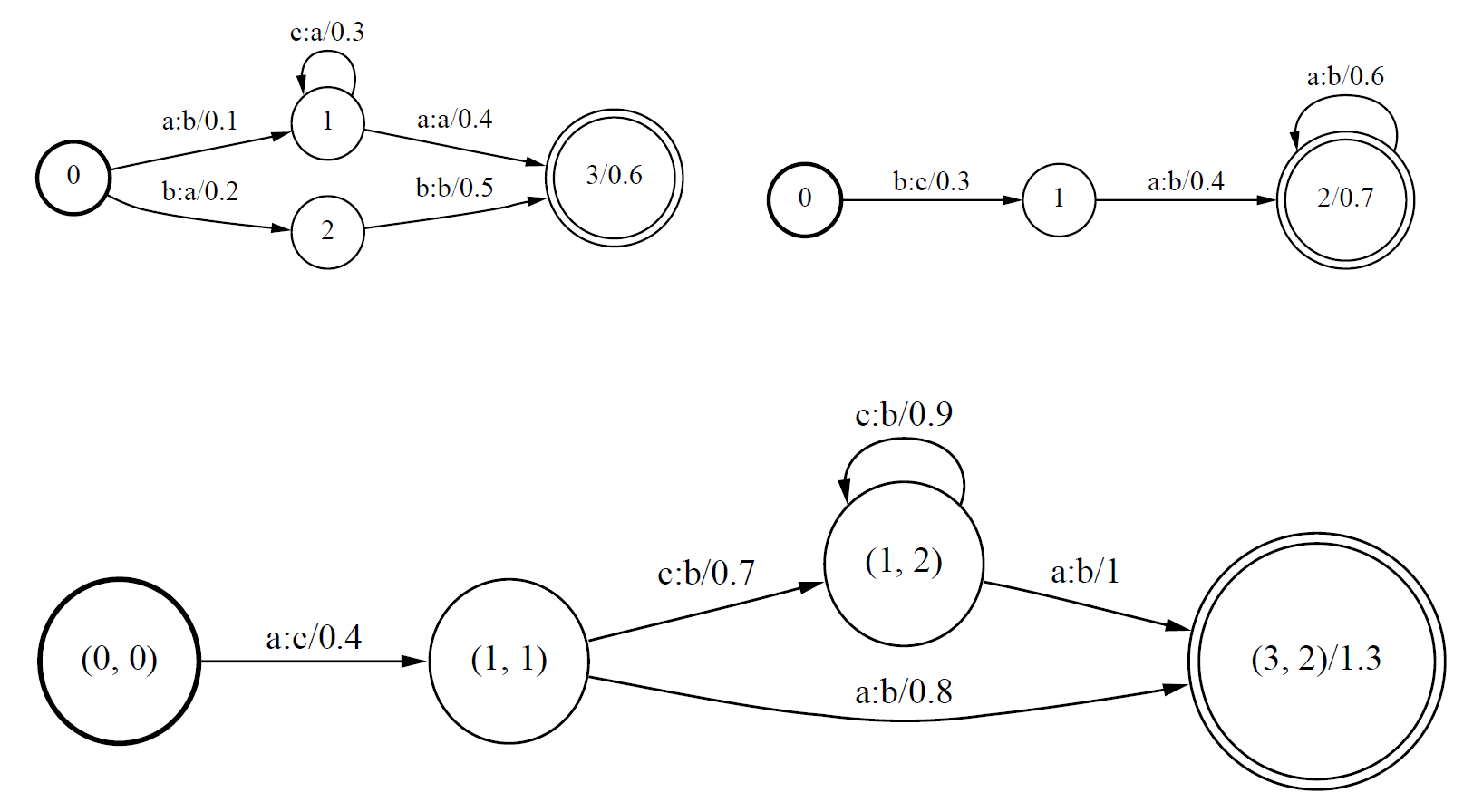
<p>The operation of composition essentially consists in checking transitions in both input transducers and adding an arc to the output graph whenever the output label of the first transducer matches the input of the second one. This creates a mapping between the input of $T_1$ and the output of $T_2$. A visual example, also from <a href="#references">[2]</a>, is shown in <a href="#fig7">Figure 7</a>. It works like <a href="https://en.wikipedia.org/wiki/Function_composition">function composition</a>, where the composition $(f\circ g)(x)$ of function $f$ with function $g$ is equal to $f(g(x))$.</p>

<p style="font-size: 80%; text-align: center;" id="fig7"><img src="/assets/images/composition.png" alt="composition" /><br />
<strong>Figure 7:</strong> Example of a basic transducer composition <a href="#references">[1]</a>. The upper left transducer is $T_1$, the upper right one is $T_2$, and the graph below them is the result.</p>

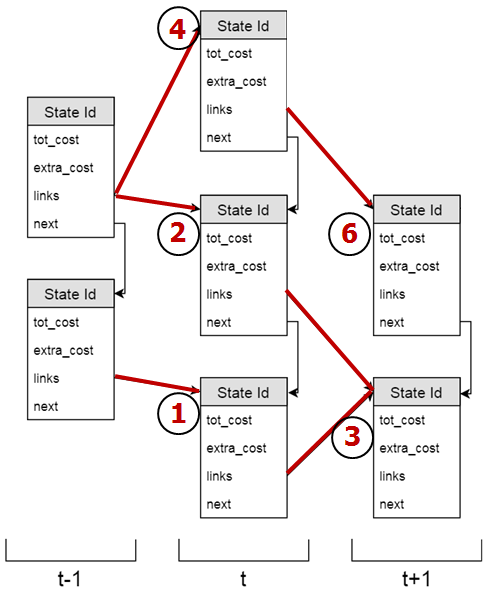
<p>During decoding, the decoder examines the word-sequence search space beginning with start states and evaluates transition costs in order to build a <em>lattice</em>, a representation of the alternative $n$-best word-sequences</p>

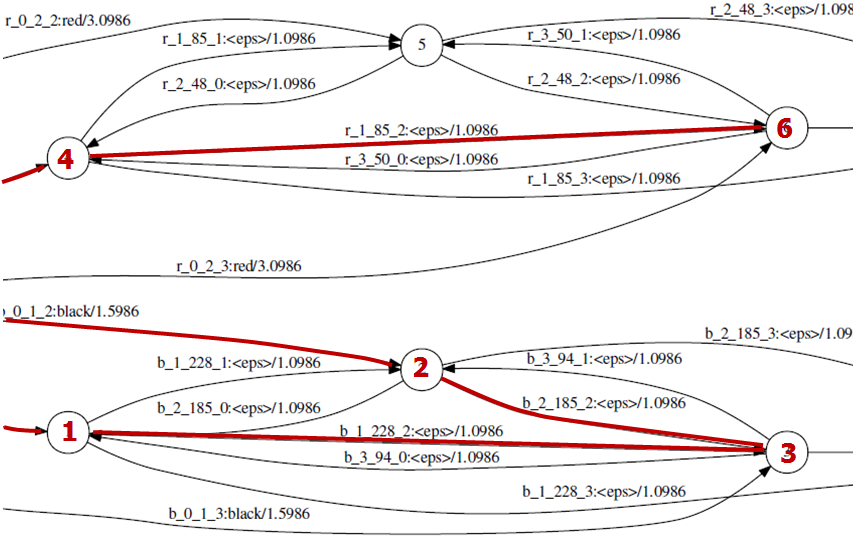
<p>Below is an illustration of decoding operation. For each time frame, visited states are saved in the form of tokens, with links to other states. Notice how not all states and transitions make their way into the lattice (and those that are there can still be removed via pruning).</p>

<p style="font-size: 80%; text-align: center;" id="fig8"><img src="/assets/images/static_searchspace.png" alt="lattice_decoded" /><br />
<strong>Figure 8:</strong> Example FST examined during decoding.</p>

<p style="font-size: 80%; text-align: center;" id="fig9"><img src="/assets/images/lattice_decoded.png" alt="lattice_decoded" /><br />
<strong>Figure 9:</strong> Example lattice created from decoding.</p>

<p>Kaldi creates a data structure corresponding to a full state-level lattice, so for every arc of $HCLG$ traversed, a separate arc is created in the lattice, with acoustic and graph cost stored separately, as illustrated in <a href="#fig9">Figure 9</a>. This structure is pruned periodically, and the final pruned graph then has its epsilons removed and is determinized <a href="#references">[4]</a>.</p>

<p>More on the theory of weighted finite state transducers can be found in <a href="#references">[1]</a>. For more on Kaldi, check out their <a href="https://kaldi-asr.org/doc/index.html">documentation page</a>.</p>

<h2 id="references">References</h2>

<p>[1] <a href="https://wiki.eecs.yorku.ca/course_archive/2011-12/W/6328/_media/wfst-lvcsr.pdf">Mohri, M., Pereira, F., &amp; Riley, M. (2008). Speech recognition with weighted finite-state transducers. In Springer Handbook of Speech Processing (pp. 559–584). Springer.</a></p>

<p>[2] <a href="https://arxiv.org/pdf/0812.3496">Akian, M., Gaubert, S., &amp; Guterman, A. (2009). Linear independence over tropical semirings and beyond. Contemporary Mathematics, 495, 1.</a></p>

<p>[3] <a href="https://infoscience.epfl.ch/record/192584/files/Povey_ASRU2011_2011.pdf">Povey, D., Ghoshal, A., Boulianne, G., Burget, L., Glembek, O., Goel, N., Hannemann, M., Motlicek, P., Qian, Y., Schwarz, P., Silovsky, J., Stemmer, G., &amp; Vesely, K. (2011, December). The Kaldi Speech Recognition Toolkit. IEEE 2011 Workshop on Automatic Speech Recognition and Understanding.</a></p>

<p>[4] <a href="http://www.fit.vutbr.cz/research/groups/speech/publi/2012/povey_icassp2012_0004213.pdf">Povey, D., Hannemann, M., Boulianne, G., Burget, L., Ghoshal, A., Janda, M., Karafiát, M., Kombrink, S., Motlı́ček Petr, Qian, Y., &amp; others. (2012). Generating exact lattices in the WFST framework. Acoustics, Speech and Signal Processing (ICASSP), 2012 IEEE International Conference On, 4213–4216.</a></p>]]></content><author><name>Danilo de Oliveira</name></author><category term="Blog" /><category term="ASR" /><category term="WFST" /><summary type="html"><![CDATA[]]></summary></entry><entry><title type="html">Dynamic WFST-based Decoder for Automatic Speech Recognition</title><link href="https://orsdanilo.github.io/blog/asr-dynamic-decoder/" rel="alternate" type="text/html" title="Dynamic WFST-based Decoder for Automatic Speech Recognition" /><published>2020-07-20T00:00:00+00:00</published><updated>2020-07-22T01:27:00+00:00</updated><id>https://orsdanilo.github.io/blog/asr-dynamic-decoder</id><content type="html" xml:base="https://orsdanilo.github.io/blog/asr-dynamic-decoder/"><![CDATA[<style>
table:nth-of-type(1) {
    display:table;
    width:100%;
}
</style>

<p>This post is the executive summary of my final project for graduate school in France. The work was conducted from April to September 2018 in the Speech and Sound Group (SSG) at Sony, in Germany, under the supervision of Marc Ferras-Font. The project used mainly Kaldi <a href="#references">[1]</a>, an open-source toolkit for Automatic Speech Recognition. <a href="https://github.com/orsdanilo/asr-dynamic-wfst-decoder/tree/master/executive_summary_FR">Click here</a> for the French version.</p>

<p>Automatic Speech Recognition (ASR) systems convert speech from a recorded audio signal to text. Such systems aim to infer the original words given an observable signal, most commonly following a probabilistic approach. We call decoding the process of calculating which sequence of words is most likely to match the acoustic signal <a href="#references">[2]</a>.</p>

<p>One extensively used way of searching the best word sequence involves the use of Weighted Finite State Transducers (WFST), static graphs encoding the whole word-sequence search space. They contain many levels of information, and define what is allowed (and more probable) in the language. During decoding, the decoder examines them in order to predict the best sequence(s) - the most probable / less costly path(s).</p>

<p style="font-size: 80%; text-align: center;" id="fig1"><img src="/assets/images/grammar_brcd.png" alt="Example grammar WFST" />
<strong>Figure 1:</strong> Example grammar WFST. Transitions contain input and output labels and a probability (or a cost) of making such transition. 
A path from a start to an end state <em>transduces</em> one input sequence of labels to an output one.</p>

<p>The internship consisted in the investigation and implementation of ways to allow dynamic changes to the decoding graphs and/or decoding process of a WFST-based decoder. The main goals were to create class-based decoders, as well as the use of dynamic approaches for the construction of cascades of WFSTs.</p>

<p>We managed to implement functional decoders that are class based; numbers were kept in a separate graph, and this graph was replaced in a main graph whenever a quantity was expected. This makes it easier for modifications, since OOVs can be more easily inserted into their respective class graphs due to the reduced size of the latter. This technique can be extended to other classes, such as names of people and cities, which are often unknown to the system.</p>

<p>The WFST examined during decoding is a combination (composition) of different graphs with multiple levels of information. These graphs are usually combined before the decoding operation, but this increases significantly the WFST size. We managed to implement this combination during decoding, so the search space is constructed on-the-fly. This significantly reduces memory usage both in graph on-disk storage and RAM resources during decoding.</p>

<p>These two features were combined in a sole decoder that includes on-the-fly class replacement and on-the-fly composition. Table 1 presents the performance of the different decoders that were implemented over the course of this internship. Word Error Rate (WER) expresses the error of the predictions (less is better) and Real Time Factor (RTF) shows the speed (less is better, 1.0 means real time). <em>Static</em> is the original case; <em>Static Replace</em> adds the replacement of class graphs in the main transducer; <em>Lazy</em> implements the on-the-fly combination of the different levels of representation; and <em>Lazy Replace</em> uses both techniques in the same decoder.</p>

<table id="tab1">
  <thead>
    <tr>
      <th style="text-align: center">Type</th>
      <th style="text-align: center">WER</th>
      <th style="text-align: center">RTF</th>
    </tr>
  </thead>
  <tbody>
    <tr>
      <td style="text-align: center">Static</td>
      <td style="text-align: center">10.0%</td>
      <td style="text-align: center">0.37</td>
    </tr>
    <tr>
      <td style="text-align: center">Static Replace</td>
      <td style="text-align: center">11.2%</td>
      <td style="text-align: center">0.39</td>
    </tr>
    <tr>
      <td style="text-align: center">Lazy</td>
      <td style="text-align: center">13.4%</td>
      <td style="text-align: center">1.28</td>
    </tr>
    <tr>
      <td style="text-align: center">Lazy Replace</td>
      <td style="text-align: center">14.4%</td>
      <td style="text-align: center">1.48</td>
    </tr>
  </tbody>
</table>
<p style="font-size: 80%; text-align: center;"><strong>Table 1:</strong> Scores obtained for lazy composition experiments.</p>

<p>Granted, the performance of the dynamic decoder is worse than the original non-lazy, non-replaced graph, both in terms of accuracy and speed. Nevertheless, this impact on performance was expected; the original graph, though impractical in terms of size, is further optimized, since it’s a single piece. Our implemented graph can also be further optimized so as to get as close a performance as possible to the original, ordinary graph.</p>

<h2 id="references">References</h2>

<p>[1] <a href="https://infoscience.epfl.ch/record/192584/files/Povey_ASRU2011_2011.pdf">Povey, D., Ghoshal, A., Boulianne, G., Burget, L., Glembek, O., Goel, N., Hannemann, M., Motlicek, P., Qian, Y., Schwarz, P., Silovsky, J., Stemmer, G., &amp; Vesely, K. (2011, December). The Kaldi Speech Recognition Toolkit. IEEE 2011 Workshop on Automatic Speech Recognition and Understanding.</a></p>

<p>[2] <a href="https://books.google.com.br/books?hl=pt-BR&amp;lr=&amp;id=H_rGeqqaulYC&amp;oi=fnd&amp;pg=PR3&amp;dq=Gruhn,+R.+E.,+Minker,+W.,+%26+Nakamura,+S.+(2011).+Statistical+Pronunciation+Modeling+for+Non-Native+Speech+Processing.+Springer+Berlin+Heidelberg.&amp;ots=fvEiLQNOnn&amp;sig=xEkxaP7JGRYzddwxUg-6GQMEHN8#v=onepage&amp;q=Gruhn%2C%20R.%20E.%2C%20Minker%2C%20W.%2C%20%26%20Nakamura%2C%20S.%20(2011).%20Statistical%20Pronunciation%20Modeling%20for%20Non-Native%20Speech%20Processing.%20Springer%20Berlin%20Heidelberg.&amp;f=false">Gruhn, R. E., Minker, W., &amp; Nakamura, S. (2011). Statistical Pronunciation Modeling for Non-Native Speech Processing. Springer Berlin Heidelberg.</a></p>]]></content><author><name>Danilo de Oliveira</name></author><category term="Blog" /><category term="ASR" /><category term="Decoder" /><summary type="html"><![CDATA[]]></summary></entry></feed>